We Measured What ATS Parsers Actually See Inside Your PDF
We rendered PDFs at increasing heading letter-spacing and extracted their text layers. Past a measurable threshold, 'EXPERIENCE' becomes 'E X P E R I E N C E' — invisible to keyword search. Here's the data, and the 30-second way to test your own resume.
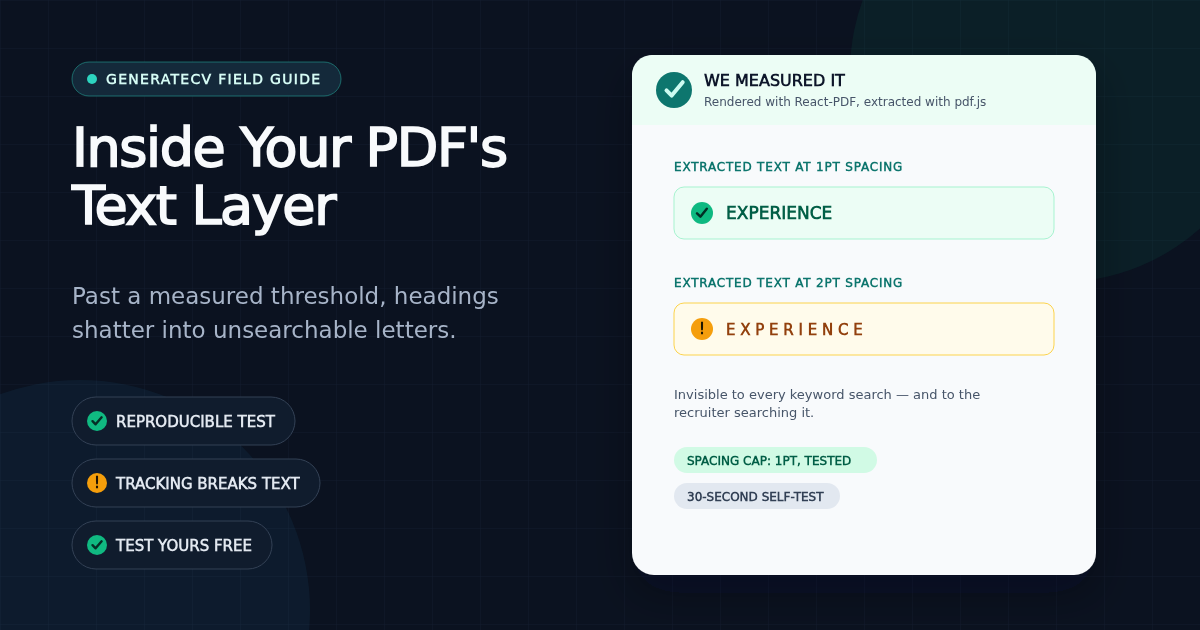
Every PDF has two layers: the pixels you see, and a hidden text layer — the characters a machine extracts when it reads the file. Applicant tracking systems never see your beautiful typography. They see the text layer, and only the text layer.
While testing our own product, we found a resume whose parser output contained this:
E X P E R I E N C E
The heading looked perfect on screen. But in the text layer, every letter had become its own word. A recruiter's search for that section — or software trying to map it — finds nothing. The culprit: wide letter-spacing (tracking), the styling trick many design tools apply to uppercase headings by default.
The experiment
We generated PDFs of the same heading at increasing letter-spacing values, then extracted each file's text layer with pdf.js — the same class of extraction that resume parsers use. The results had a clean threshold:
| Letter-spacing (pt) | What the text layer contains |
|---|---|
| 0 – 1.0 | TECH STACK — intact, searchable |
| 1.5 – 3 | T E C H S TA C K — every glyph its own token |
Below roughly one point of spacing, extractors read words normally. Above it, the gaps between letters cross the extractor's word-boundary threshold, and the spaces become real — no parser downstream can reliably undo them.
Why this matters more than most formatting advice
- Headings are structural anchors. Parsers map your content into a database by recognizing "Experience", "Education", "Skills". A letter-spaced heading unrecognizable in the text layer can scramble how the entire section is filed.
- Names become unsearchable. Many stylish templates letter-space the candidate's name. A recruiter searching the ATS for "Jordan Smith" will not match
J O R D A N S M I T H. You'd be in the database and still unfindable — the quietest possible failure. - It's invisible in review. The PDF looks flawless. Nothing warns you. You can only see it by inspecting the text layer.
We failed our own test
Full disclosure: we found this because our own cover-letter templates were doing it. One styled the candidate's name at 3 points of spacing — deep in the corrupted zone. We capped every template at 1 point and added an automated test to our build that fails if any template ever crosses the threshold again. If we hadn't measured, we'd still be shipping it.
The 30-second test for your resume
- Open your resume PDF in any viewer.
- Select all (Ctrl/Cmd-A), copy, and paste into a plain text editor.
- Look at what came out. Are your section headings intact words? Is your name spelled without gaps? Is the content in reading order, or did a two-column layout interleave into nonsense?
What you pasted is approximately the record an ATS builds from your file. If it's clean, wide tracking isn't your problem. If it's scrambled, no amount of keyword optimization will matter until the extraction is fixed — usually by reducing heading letter-spacing, switching to a single-column layout, or exporting from a tool that keeps its text layer clean.
Our free checker runs this analysis automatically (plus heading detection and keyword matching), entirely in your browser — your resume never leaves your machine, and we don't ask for an email. Our complete ATS-friendly resume format guide covers layout, headings, PDF versus DOCX, and truthful keywords. But honestly, the copy-paste test above catches the worst text-layer failure, and it costs you nothing either.
Run the free check — no signup
See exactly how your resume scores against real ATS filters — free, unlimited, and it stays in your browser.
Related Articles
How Our Free Resume Checker Calculates Its Score
The category weights, extracted-text checks and limitations behind GenerateCV's local resume report.
Read articleATS-Friendly Resume Format: A Practical Checklist and Template
An ATS-friendly resume is not a document stuffed with keywords or stripped of personality. It is a readable resume whose text extracts in the right order, uses recognizable sections, and proves the requirements of one real job.
Read articleNo, an ATS Probably Didn't Auto-Reject Your Resume
The '75% of resumes are rejected by ATS' statistic traces back to a defunct vendor with no published methodology. Here's what applicant tracking systems actually do — and what actually gets resumes skipped.
Read article